
The Plan
A 30-minute, step-by-step plan to help you take back your time and reconnect with what matters most.

Overview
This plan is a simple 7-step process designed to make your phone radically less exciting to use so your life gets better. The goal of this plan is rapidly reduce undesired phone use without making our phones less functional or deleting all our social media accounts.
This takes 15-30 minutes to do. To do it you will need the following:
- Your phone.
- A notepad and pen.
- A laptop, computer or secondary device.
If you’re unsure if this plan is right for you then check out Questions and Screener.
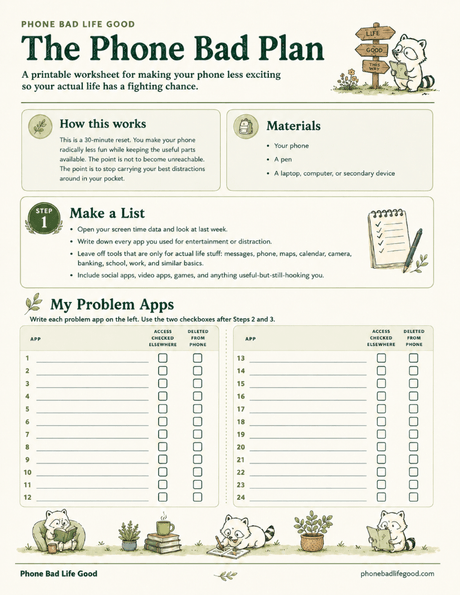
Printable checklist
Want the plan as a printable checklist?
No email signup. Open the fillable PDF directly, or keep reading and come back to it later.
Make a List
- Open your screen time data. Choose “See All App & Website Activity.”
- Go to your usage from last week. If looking at the hours wasted is uncomfortable, great you’re in the right place.
- Go through your list of most used apps starting from the most used. In your notepad, write down every app you used for entertainment and distraction last week. The only apps not on this list should be for actual life stuff only.
- Apps that are only for communicating with others — like text message apps, phone apps, and work messaging apps — don’t go on this list. But apps that both distract and communicate — like all your socials — go on the list.
- This list should also include apps which are useful in other ways but still distracting. Dr. YouTube has taught many of us a lot but Shorts do not belong on your phone.
- This also for sure includes any and all games (yes, even Chess and Wordle).
- This list is your list of problem apps. This is the list of things which will be gone from your phone 30 minutes from now.
- While you’re here, make sure you have your weekly screen time report turned on. This will give you a measure to stay accountable and seeing your screentime down 50% next week will be quite the hit of that sweet, sweet dopamine.
Ensure Access to Problem Apps (Somewhere Else)
Many people whose problem apps are hurting their lives use those apps for good reasons. But these platforms are designed to be addictive — especially when they’re in your pocket 24/7. The goal of this plan is not to delete the things you love. It is to get them out of your pocket so that you no longer engage with them automatically, thoughtlessly and constantly.
This step sets up a backup device so you still have access to your problem applications. You can still get the utility out of them, and still reply to your DM’s, just at a human pace.
- Grab your laptop, computer or secondary device.
- Go through your problem app list one by one. Make sure you have access to each app on this second device. Sometimes this means downloading them. Other times it just means opening them in your browser and trying to log on.
- Update any passwords in your password keeper as you go. If you don’t already use a password keeper, start one and save as you go.
Remove all Problem Apps from Your Phone
Now that you’re sure you get into all of your accounts, it’s time to get these apps off your phone.
- Find and delete all problem apps from your phone, checking them off your list as you go.
- Do not move them somewhere else or hide them.
- Just get rid of them — you can use them on your second device anytime you want.
Touch up Your Home Screen
Now that problem apps are removed, we are going to touch up your home screen. Again, we want lots of change all at once so your habits automatically shift. Center important continued uses on your home screen. Make it look clean and organized. You are reinforcing the new reality that this is a tool for building Life Good; not a zombification device you lose hours each day to.
Here are some of the things most people want on their home screen:
- Communication apps: text messages, phone, email, slack or other work platforms — anything you use to stay in touch.
- Tools: Calendar, clock, calculator, maps, camera, notes, banking apps, healthcare apps, school apps, our turtle’s smart home — all the stuff that makes our phones essential to daily life.
- Audio/Listening Apps: Spotify, iTunes, Podcasts, Audible — whatever you use to listen to music or audio content while you’re going out there and building Life Good.
Add a Good Replacement App (or two)
In addition to the tools you are already using you will want to have a replacement thing to “check” on your home screen. Look, real talk, you habitually check your phone and use it whenever you feel slightly bored or uncomfortable. This habit is going to continue. You are not going to magically start remembering to bring a book or notebook with you wherever you go. You will want to have a thing to look at when you’re using the bathroom. Don’t blame us, we don’t make the rules.
The point of this step is to plan ahead for this. Rather than having nothing to open, you want to have something to open which is only really interesting for a few minutes at a time, or a few times a day. The goal isn’t to never check the phone, it’s to make sure that whatever we are checking is boring enough we don’t get sucked in.
Below are some ideas, pick at least one or two to start.
- A boring social platform — Substack and LinkedIn are good at being boring currently. But be aware, if you find these starting to hook you they’ll need to go too.
- A news app — Dealer’s choice here: The New York Times, CNN, Fox News. Whatever brand of sicko you are. A big corporation’s news app will keep you in the loop, but they’re not nearly as good at turning you into a zombie as the tech companies.
- A bunch of email newsletters — This turns your email inbox into the go-to thing you check. Substack is great for this. So are news outlets — both big and small usually have a newsletter that goes out daily. And many creators who post videos also have one. Sign up for a bunch if they’re weekly or a few if they’re daily.
- A daily spiritual reader app — If you’re at all religiously or spiritually inclined then this is a great one. There are lots of apps which assign daily readings from various faith traditions. We’ve seen apps with daily readings out of the Bible, the Torah, the Quran, the Buddhist Canons, and the Stoic classics. I’m sure there are lots more. Find one that speaks to you.
- An e-reader — A synced e-reader app lets you pick away at a book you’re already reading while you’re between things. For avid readers can be a great replacement, but again caution can be warranted if your the kind of person who compulsively reads very large fantasy novels (not that the author of this document would know anything about this).
Grayscale Your Phone
The penultimate step helps to solidify your change by radically altering the experience of using your phone. Less color = less dopamine. Sometimes people suggest this as a standalone intervention, but it is much more effective (and sticky) when it’s part of a broader reset — like the one you’re doing now.
- Go to the “Color Filter” setting on your iPhone. You can just search for this setting or you can get there manually by going to Settings > Accessibility > Display & Text Size > Color Filters.
- Turn the toggle on.
- Make sure Grayscale is selected and intensity is turned all the way up. The colored pencils should all appear fully grayscale.
- If you need to turn grayscale off briefly, it’s easy to access from the search menu.
Start Figuring Out Life Good
Now that you’ve made Phone Bad, you need to start doing something which is actually much harder: making Life Good. Removing distractions, crushing screen time and reclaiming your attention are step 0 in this process. But it takes time to build a flourishing life away from your phone. You no longer have a “I’m bored” button on your phone which instantly makes you feel less bored. The bad news is that you’ll need to put in the work to find new solutions to your boredom.
The good news is that many of these solutions are dramatically more enriching and life affirming than pressing the “I’m bored” button. They involve spending time with your friends, learning new crafts, exploring your interests, engaging with your faith, cleaning your room, calling your mom. They also include some “bad” habits — watching TV, playing video games, even browsing the problematic apps you just deleted off your phone. But at least these habits are no longer with you 24/7. They are now dramatically less likely to interrupt your life while you’re trying to do work, overcome a challenging problem, or spend time with people you care about.
It’ll probably be a bumpy ride. But it’s worth it and you’ve totally got this.
Printable checklist
Want the plan as a printable checklist?
No email signup. Open the fillable PDF directly, or keep reading and come back to it later.